Tutorial with Python
In this section, we’ll look at a few examples of how to use MUSCLE3 to create a multiscale simulation in Python.
The source code for these examples is here.
You can also clone the repository or download the source (see the C++ part of
the Installation section) and go to docs/source/examples/python, or
copy-paste the code from here. If you’re cloning, be sure to use the master
branch. develop may have changes incompatible with the current release.
The easiest way to get set up is to create a virtualenv and then install MUSCLE
3 and the additional requirements inside it. Running make in the
examples/python directory will make a virtual environment in
examples/python/build/venv:
examples/python$ make

# or by hand:
examples/python$ python3 -m venv build/venv              # create venv
examples/python$ . build/venv/bin/activate               # activate it
examples/python$ pip3 install -r requirements.txt        # install dependencies
If you get an error message saying amongst others error: invalid command
'bdist_wheel', try running pip3 install wheel and then pip3 install -r
requirements.txt again to fix it. Or if you have administrator rights,
apt-get install python3-wheel will also work, and fix this issue for the
whole system.
You can then run the example described below by activating the virtual
environment, and then running the file reaction_diffusion.py:
examples/python$ . build/venv/bin/activate
exmaples/python$ python3 reaction_diffusion.py
Our first example is a reaction-diffusion model on a 1D grid. The model is configured so that the diffusion process is much slower than the reaction process. This time scale separation makes this a multiscale model, which can be implemented efficiently using operator splitting.
This means in this case that we will integrate the state of the system over time by applying the diffusion operator at a large time step, with many applications of the reaction operator in between, using a much smaller time step.
With MUSCLE3, we implement each process in its own function, with its own time integration loop. Each function is run simultaneously by MUSCLE3, with the state transferred between them via messages whenever we switch from applying the diffusion operator to applying the reaction operator or vice versa. This communication pattern between the processes is specified separately.
This way of designing the implementation has a bit more structure than a single integrated script, but it’s really a better design because it allows us to implement one process at a time (possibly using a different existing code for each, and even a different programming language), and to figure out the connections separately. Implementing more complex models is easier if you split the work into separate tasks.
But first, we’ll do a reaction-diffusion model. Here’s how to implement it with MUSCLE3. (A detailed explanation follows below the code.)
docs/source/examples/python/reaction_diffusion.pyimport logging
import os
import numpy as np
from libmuscle import Grid, Instance, Message
from libmuscle.runner import run_simulation
from ymmsl.v0_2 import (
Component, Conduit, Configuration, Model, Operator, Ports, Settings)
def reaction() -> None:
"""A simple exponential reaction model on a 1D grid.
"""
instance = Instance({
Operator.F_INIT: ['initial_state'], # 1D Grid
Operator.O_F: ['final_state']}) # 1D Grid
while instance.reuse_instance():
# F_INIT
t_max = instance.get_setting('t_max', 'float')
dt = instance.get_setting('dt', 'float')
k = instance.get_setting('k', 'float')
msg = instance.receive('initial_state')
U = msg.data.array.copy()
t_cur = msg.timestamp
while t_cur + dt < msg.timestamp + t_max:
# O_I
# S
U += k * U * dt
t_cur += dt
# O_F
instance.send('final_state', Message(t_cur, data=Grid(U, ['x'])))
def laplacian(Z: np.array, dx: float) -> np.array:
"""Calculates the Laplacian of vector Z.
Args:
Z: A vector representing a series of samples along a line.
dx: The spacing between the samples.
Returns:
The second spatial derivative of Z.
"""
Zleft = Z[:-2]
Zright = Z[2:]
Zcenter = Z[1:-1]
return (Zleft + Zright - 2. * Zcenter) / dx**2
def diffusion() -> None:
"""A simple diffusion model on a 1d grid.
The state of this model is a 1D grid of concentrations. It sends
out the state on each timestep on `state_out`, and can receive an
updated state on `state_in` at each state update.
"""
instance = Instance({
Operator.O_I: ['state_out'],
Operator.S: ['state_in']})
while instance.reuse_instance():
# F_INIT
t_max = instance.get_setting('t_max', 'float')
dt = instance.get_setting('dt', 'float')
x_max = instance.get_setting('x_max', 'float')
dx = instance.get_setting('dx', 'float')
d = instance.get_setting('d', 'float')
U = np.zeros(int(round(x_max / dx))) + 1e-20
U[25] = 2.0
U[50] = 2.0
U[75] = 2.0
Us = U
t_cur = 0.0
while t_cur + dt <= t_max:
# O_I
t_next = t_cur + dt
if t_next + dt > t_max:
t_next = None
cur_state_msg = Message(t_cur, t_next, Grid(U, ['x']))
instance.send('state_out', cur_state_msg)
# S
msg = instance.receive('state_in', default=cur_state_msg)
if msg.timestamp > t_cur + dt:
logging.warning('Received a message from the future!')
np.copyto(U, msg.data.array)
dU = np.zeros_like(U)
dU[1:-1] = d * laplacian(U, dx) * dt
dU[0] = dU[1]
dU[-1] = dU[-2]
U += dU
Us = np.vstack((Us, U))
t_cur += dt
if 'DONTPLOT' not in os.environ and 'SLURM_NODENAME' not in os.environ:
from matplotlib import pyplot as plt
plt.figure()
plt.imshow(
np.log(Us),
origin='upper',
extent=[
-0.5*dx, x_max - 0.5*dx,
(t_max - 0.5*dt) * 1000.0, -0.5*dt * 1000.0],
interpolation='none',
aspect='auto'
)
cbar = plt.colorbar()
cbar.set_label('log(Concentration)', rotation=270, labelpad=20)
plt.xlabel('x')
plt.ylabel('t (ms)')
plt.title('Concentration over time')
plt.show()
if __name__ == '__main__':
logging.basicConfig()
logging.getLogger().setLevel(logging.INFO)
components = [
Component(
'macro', Ports(o_i=['state_out'], s=['state_in']),
'This is the macro model, which calculates the diffusion',
implementation='diffusion'),
Component(
'micro', Ports(f_init=['initial_state'], o_f=['final_state']),
'This is the micro model, which calculates the reaction',
implementation='reaction')]
conduits = [
Conduit('macro.state_out', 'micro.initial_state'),
Conduit('micro.final_state', 'macro.state_in')]
model = Model(
'reaction_diffusion',
description='Reaction-diffusion model example',
components=components, conduits=conduits)
settings = Settings({
'micro.t_max': 2.469136e-6,
'micro.dt': 2.469136e-8,
'macro.t_max': 1.234568e-4,
'macro.dt': 2.469136e-6,
'x_max': 1.01,
'dx': 0.01,
'k': -4.05e4, # reaction parameter
'd': 4.05e-2 # diffusion parameter
})
configuration = Configuration(
'Macro-micro configuration', models=[model], settings=settings)
implementations = {'diffusion': diffusion, 'reaction': reaction}
run_simulation(configuration, implementations)
Let’s take it step by step.
Importing headers
import logging
import os

import numpy as np

from libmuscle import Grid, Instance, Message
from libmuscle.runner import run_simulation
from ymmsl.v0_2 import (
        Component, Conduit, Configuration, Model, Operator, Ports, Settings)
As usual, we begin by importing some required libraries. The Python standard library
provides the logging and os libraries, and we use NumPy for matrix math.
From libmuscle, we import libmuscle.Instance, which will
represent a model instance (here either reaction or diffusion) in the larger simulation,
and libmuscle.Message, which represents a MUSCLE message as passed between
instances. The libmuscle.run_simulation() function allows us to run a
complete simulation from a single Python file.
In order to describe the connections between the reaction and diffusion processes, we use definitions from ymmsl-python. More about those below.
The reaction model
Next is the reaction model. It is defined as a single Python function that takes no arguments and returns nothing. This function contains a loop in which we step through time, and inside of the loop is the code to calculate the next state from the current one using a simple exponential growth model and an explicit Euler integrator.
Note that this code uses type annotations to show the types of function arguments and return values. These are ignored by the Python interpreter, and also by MUSCLE3, so you don’t have to use them in your own code if you don’t want to. They’re worth learning more about though, as you can see they make the code easier to understand.
The first step in a MUSCLE model is to create an libmuscle.Instance
object:
def reaction() -> None:
    instance = Instance({
            Operator.F_INIT: ['initial_state'],       # 1D Grid
            Operator.O_F: ['final_state']})           # 1D Grid
    # ...
The constructor takes a single argument, a dictionary that maps operators to lists of ports. Ports are used by submodels to exchange messages with other submodels. Operators specify when each port is used by the model.
Conceptually, in MUSCLE3 each submodel is a function that creates an initial state, does
one or more time steps simulating a process, and then finishes. The creation of the
initial state is called the F_INIT operator in MUSCLE3 terms. Note that this is a
MUSCLE3 operator, not a physics operator! Likewise, there is a MUSCLE3 operator called
O_F which describes the part of the calculations after the timestepping is done.
In this model, we’re planning to run many reaction steps in between each pair of
subsequent diffusion time steps. We can do this by running the reaction model
repeatedly. On each run, we’ll receive the system state in F_INIT, using the
initial_state port, then we’ll run the reaction time steps, and then we’ll send the
updated state back during O_F using the final_state port so that the diffusion
model can do its next timestep.
Ports can be input ports or output ports, but not both at the same time. F_INIT
ports can only be used to receive, and O_F ports only to send.
Besides the definition of the ports, we document the type of data we’ll send or receive in a comment. This is obviously not required, but it makes life a lot easier if someone else needs to use the code or you haven’t looked at it for a while, so it’s highly recommended. Available types are described below.
The reuse loop
while instance.reuse_instance():
    # F_INIT
    # State update loop
    # O_F
Now that we have an libmuscle.Instance object, we can start the reuse loop.
As mentioned above, we want to run the reaction model repeatedly in between each pair of
diffusion state updates. To be able to do that, we wrap the entire model code in an
extra loop, which is called the reuse loop. Note that all MUSCLE3-enabled codes have a
reuse loop, regardless of how often they run in a particular simulation.
In this case, we’ll need to run this loop exactly once for every time step of the
diffusion model. Since this is not the diffusion model, we can’t know how many times
that is, so we just ask MUSCLE3 whether we need to run again via the
libmuscle.Instance.reuse_instance() method and let it figure things out for us.
Initialisation: Settings and receiving messages
while instance.reuse_instance():
    # F_INIT
    t_max = instance.get_setting('t_max', 'float')
    dt = instance.get_setting('dt', 'float')
    k = instance.get_setting('k', 'float')

    msg = instance.receive('initial_state')
    U = msg.data.array.copy()

    t_cur = msg.timestamp
Next is the first part of the model, in which the state is initialised. This is what
MUSCLE3 calls F_INIT. Here, we ask MUSCLE for the values of some settings that we’re
going to need later, in particular the total time to simulate, the time step to use, and
the model parameter k. We’ll see later where these settings come from.
The second argument to Instance.get_setting(), which specifies the expected type,
is optional. If it’s given, MUSCLE will check that the value specified for this setting
is of that type, and if not raise an exception. Note that getting settings needs to
happen within the reuse loop; doing it before can lead to incorrect results in some
cases.
You can also provide a default value as a keyword
argument, which will be returned if the setting is not configured. If no default
is provided and the setting is missing, a KeyError will be raised.
After getting our settings, we receive the initial state on the initial_state port.
The message that we receive contains several bits of information. The data attribute
contains the data that was put into this message by the sender. We cannot control what
that is exactly, but we’ll assume it to be a 1D array of floats containing our initial
state, which we’ll store in the variable U.
In particular, we’ll assume that the msg.data attribute holds an object of
type libmuscle.Grid, which holds a read-only NumPy array and optionally a list
of index names. Here, we take the array and make a copy of it for U, so that we can
modify U in our upcoming state update. Without calling .copy(), U would end
up pointing to the same read-only array, and we’d get an error message if we tried to
modify it.
Finally, we’ll initialise our simulation time to the time at which that state is
valid, which is contained in the timestamp attribute. This is a
double precision float containing the number of simulated (not wall-clock)
seconds since the whole simulation started.
The state update loop
# F_INIT

while t_cur + dt < msg.timestamp + t_max:
    # O_I

    # S
    U += k * U * dt
    t_cur += dt

# O_F
Having initialised the model, it is now time for the state update loop. If you’ve written a time integration code before, then this will look familiar: we loop until we reach our maximum time (now relative to when we started), and on each iteration update the state according to the model equation, and the current time by the time step.
As you can see from the comments, there are two more MUSCLE3 operators here, which we don’t use in this model. We’ll come back to them when we make the diffusion submodel.
Sending the final result
# O_F
instance.send('final_state', Message(t_cur, data=Grid(U, ['x'])))
After the update loop is done, the model has arrived at its final state. We
finish up by sharing that final state with the outside world, by sending it on
the final_state port. The part of the code after the state update loop (but
still within the reuse loop) is known as the O_F operator, so that is where we
declared this port to live in our libmuscle.Instance declaration above.
To send a message, we specify the port on which to send (which must match the
declaration by name and operator), and pass a libmuscle.Message object
containing the current simulation time and the current state, converted to a Grid.
MUSCLE3 can send and receive a range of different data types inside messages, including integers, floats, boolean, strings, lists and dictionaries, and additionally NumPy arrays and byte arrays. In most cases, all data you send or expect to receive on a particular port will be of the same type, but it doesn’t have to be.
This flexibility is very convenient, but it does make it more difficult for someone trying to understand your code (or who wants to use your submodel in their simulation!) to know what you’re sending or are expecting to receive. Se please make sure that you document, for each port, which data type you’re expecting or sending! Your future colleagues (and likely your future self) will thank you.
Arrays are of course commonly used in computational science, but not all programming
languages support them directly, so MUSCLE3 has its own class for sending them called
libmuscle.Grid. In Python, these contain a NumPy array and a list of names of
the dimensions. In this case there’s only one, and x is not very descriptive, so we
could have also passed U directly, in which case MUSCLE would have sent a
libmuscle.Grid without index names automatically.
Note that grids (and NumPy arrays) are much more efficient than lists and dictionaries. If you have a lot of data to send, then you should use those as much as possible. For example, a set of agents is best sent as a dictionary of 1D NumPy arrays, with one array/grid for each attribute. A list of dictionaries will be quite a bit slower and use a lot more memory, but it should work up to a million or so objects.
Finally, if you want to use your own encoding, you can just send a bytes
object, which will be transmitted as-is, with minimal overhead.
This concludes our reaction model. As you can see, submodels that are used with MUSCLE3 very much look like they would without. With one additional variable, one extra loop, and a few send and receive statements you’re ready to connect your submodel into a larger simulation.
Diffusion model
In order to make a coupled simulation, we need at least two models. The second model here is the diffusion model. Its overall structure is the same as for the reaction model, but it has a few additional features.
Recall that the diffusion process is much slower than the reaction process, and that we’re running it at a much larger time step. Before each state update by the diffusion code, we’ll do a run of the reaction model to apply a series of reaction state updates.
To do that, the diffusion code needs to send the system state to the reaction model,
receive back the updated state, and then apply its own update. We’ll do that using
two more MUSCLE3 operators called O_I and S.
O_I represents the point right at the start of the time stepping loop, before the
next state is calculated. A typical stand-alone code does not do anything here, but in a
MUSCLE3 simulation this is where a message can be sent, using a port associated with the
O_I operator, and that’s what the diffusion model does:
# O_I
t_next = t_cur + dt
if t_next + dt > t_max:
    t_next = None
cur_state_msg = Message(t_cur, t_next, Grid(U, ['x']))
instance.send('state_out', cur_state_msg)
The construction of the libmuscle.Message object is the key here. It contains
the current simulation time t_cur, the time that we’ll step to on our next state
update t_next, and the state array U wrapped in a libmuscle.Grid. If
this is the last timestep, then t_next is set to None. Once we have the message,
we can send it on our state_out port, which is declared for O_I in the diffusion
model’s libmuscle.Instance.
This deserves a bit more explanation. First, MUSCLE3 does not use the timestamps that
are attached to the messages for anything, and in this particular case, always sending
None for the second timestamp will work fine. These timestamps are necessary if two
submodels that use identical or similar timestep sizes need to be connected together. In
that case, both models will run concurrently, and they will exchange messages between
their O_I and S operators.
If their time scales (step sizes) do not match exactly, then the number of
messages sent by one submodel does not match the number of messages that the
other submodel is trying to receive, and one will end up waiting for the other,
bringing the whole simulation to a halt. To avoid this, an intermediate
component needs to be inserted, which interpolates the messages. In order to
send and receive in the correct order, this component needs to know when the
next message will be sent, and that is when the second timestamp is required.
See docs/source/examples/python/interact_coupling.py for a documented
example.
So, to make your submodel more generically usable, it’s good to set the second
timestamp. But perhaps you’re trying to connect an existing codebase that uses
varying timestep sizes, and it’s not easy to get it to tell you how big the
next timestep will be. In that case, if you’re not doing time scale overlap,
just create your message via Message(timestamp, data=...) or put None
as next_timestamp and move on to the next problem, it’ll work just fine.
Receiving messages with a default
Having sent the state, we now need to receive back the updated one. This is done in the
part of the state update loop that comes after O_I, which MUSCLE3 calls S. In
S, we can receive input and calculate the next state. In this case, we receive a
state, but in general also other kinds of inputs can be received, like boundary
conditions or fluxes.
# S
msg = instance.receive('state_in', default=cur_state_msg)
if msg.timestamp > t_cur + dt:
    logger.warning('Received a message from the future!')
np.copyto(U, msg.data.array)
The diffusion model calls libmuscle.Instance.receive() to receive back the state,
just like the reaction model used this function. This receive is a bit special in that
we are passing a default message. The default message is returned if this port is
not connected. We are cleverly passing the message containing our current
state, so that if this port is not connected, the model continues from its
current state.
MUSCLE3 will ignore send commands to ports that are not connected to anything, so this makes it possible to run the diffusion model without a micro-model attached.
Of course, a sensible default value will not be available in all cases, but if there is one, using it like this is a good idea.
Next, we check that we didn’t receive a message from the future. This should not happen if the models are truly time scale separated, as they are in this set-up. It’s possible however to choose a longer run time for the reaction model (and even to make a reaction model that runs until it reaches convergence, however long that takes), in which case it could run past our next time step, rendering the operator splitting approach invalid and the result potentially wrong, so it’s nice to get a warning if that happens.
Next, we copy the received data into our state array. The received
libmuscle.Grid object contains a read-only array, and just writing U
= msg.data.array would discard the state we have in U, and instead make
the variable U refer to the received read-only array. We would then get an
error message when trying to update the state. The np.copyto function
instead copies the (read-only) contents of msg.data.array into the existing
(writable) array referred to by U. This way, we can do our state update, and
it’s also a bit more efficient than reallocating memory all the time.
The S operator here calls the laplacian() function (not shown). There is no
requirement for a submodel to be a single function, you can split it up, call
library functions, and so on. There has to be a top-level function however if
you want to run more than one submodel in a single Python program.
Another limitation is that you cannot share any data with other components, other than by sending and receiving messages. In particular, you can’t use global variables to communicate between models. This is intentional, because it doesn’t work if you’re running as separate programs on different computers, and more importantly, because global variables create difficult to understand dependencies between different parts of your code that lead to hard to find bugs. Avoid them, with or without MUSCLE3.
Designing the connections
With both models defined, we now need to instruct MUSCLE3 on how to connect
them together. We do this by creating an object of type
ymmsl.Configuration, which contains all the information needed to run the
simulation. It often helps to draw a diagram first:
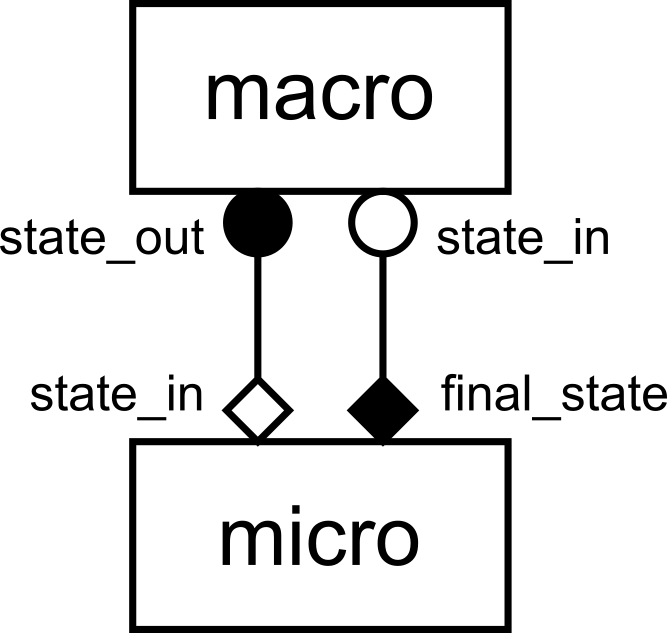
gMMSL diagram of the reaction-diffusion model.
This is a gMMSL diagram of the reaction-diffusion model. It shows that there
are two components named macro (the slow diffusion process) and micro (the fast
reaction process). A conduit, shown by a line, connects port
state_out on macro to initial_state on micro. Another conduit connects
port micro.final_state to macro.state_in.
The symbols at the ends of the conduits show the operators that the ports belong to,
O_I for macro.state_out, F_INIT for micro.state_in, and O_F and
S for micro.final_state and macro.state_in respectively..
We can use a trick to remember which symbol is for which operator: operators O_I and
S, which are within the state update loop, have a circular symbol, while F_INIT
and O_F use a diamond shape. Also, filled symbols designate ports on which messages
are sent, while open symbols designate receiving ports.
If we put this together with the submodel codes we looked at above, then we can see how
the model works. Both models start with F_INIT. The macro (diffusion) model creates
the initial state, then goes into its state update loop and enters O_I. It sends the
state on state_out, then enters S and tries to receive the updated state on
state_in.
Meanwhile, the micro (reaction) model has also started and entered F_INIT, in which
it receives that state, via the conduit, on initial_state. Since the two models are
started simultaneously, it’s possible that the reaction model tries to receive before
the diffusion model sends, in which case it will wait for the message to arrive.
Now the reaction (micro) model runs its state update loop for the configured time, and
then it enters O_F to send the updated state on final_state, via the conduit to
the diffusion model’s state_in port. The diffusion model receives it, applies its
own single state update, and then loops back in its time integration loop to send that
new state on state_out again.
Meanwhile, the reaction model was done with its timestepping, and returns to the top of its reuse loop. Since there is another incoming state, the model needs to run again, so MUSCLE3 tells it to do that, and so the simulation continues, alternating macro (diffusion) timesteps with micro (reaction) model runs.
At some point, the diffusion code decides that it has completed its final timestep. It then ends its time stepping loop, returns to the top of the reuse loop, is told by MUSCLE3 that it doesn’t need to run again, and quits, and at that point MUSCLE3 will also tell the reaction model that it can quit, finishing the simulation.
Connecting models in Python
Since diagrams aren’t valid Python, we need an alternative way of describing
this model in our code. For this, we use the ymmsl library to create a set
of objects that form a description.
components = [
        Component(
                'macro', Ports(o_i=['state_out'], s=['state_in']),
                'This is the macro model, which calculates the diffusion',
                implementation='diffusion'),
        Component(
                'micro', Ports(f_init['initial_state'], o_f=['final_state']),
                'This is the micro model, which calculates the reaction',
                implementation='reaction')]
First, we describe the two components in this model. Components can be submodels, or helper components that convert data, control the simulation, or otherwise implement required non-model functionality.
In this simple example, we only have two submodels: one named macro and one named
micro. Each component has two ports, with associated operators. These describe how
it can be connected to other components. There’s a description, so that we know what
each component does, and finally an implementation.
The implementation is referred to here by name, and is usually a program, but in this case we’ll use the Python functions we created above. Both components and implementations have ports, which need to be compatible. The ports on a component usually match those on its implementation directly, but the diffusion model for example has optional ports, and could be used to implement a component without ports, or with only one of the two.
conduits = [
        Conduit('macro.state_out', 'micro.initial_state'),
        Conduit('micro.final_state', 'macro.state_in')]

model = Model('reaction_diffusion', components, conduits)
Next, we need to connect the components together. This is done by conduits,
which have a sender and a receiver. Here, we connect sending port state_out
on component macro to receiving port initial_state on component
micro. When the simulation runs, messages sent by the implementations will pass
through these to the receiving component’s implementation.
The components and the conduits together form a Model, which has a name, a
description, and those two sets of objects.
settings = Settings({
    'micro.t_max': 2.469136e-6,
    'micro.dt': 2.469136e-8,
    'macro.t_max': 1.234568e-4,
    'macro.dt': 2.469136e-6,
    'x_max': 1.01,
    'dx': 0.01,
    'k': -4.05e4,     # reaction parameter
    'd': 4.05e-2      # diffusion parameter
    })

configuration = Configuration(model, settings)
Finally, we define the settings for our simulation by constructing a
ymmsl.Settings object from a dictionary. Note that there are two
duplicated names between the two models: t_max and dt. With MUSCLE3,
you can create a global setting with that name to set it to the same value
everywhere (handy for settings that are used by multiple components), or you can
prepend the name of the component to set the value for a specific one. Specific
settings go before generic ones, so if you specify both micro.t_max and
t_max, then the micro component will use micro.t_max and all others
will use t_max.
The model and the settings are combined into a ymmsl.Configuration, which
contains everything needed to run the simulation. A Configuration object can be saved to
or loaded from a YAML file, but we’ll not use that right now.
Launching the simulation
There are two ways of launching a MUSCLE3 simulation: locally in a Python script (as we do here), and by having the MUSCLE Manager start a set of programs implementing the components. The first option puts everything into one or more Python files and is suitable for testing, experimentation, learning, and small scale production use on a local machine. The second option, described in the Distributed execution section, is needed for larger simulations possibly on HPC machines, or if any of the components is not written in Python.
Here, we’re learning, and we have all our models in a Python file already, so
we’ll use the first option to tie them together. This uses the
libmuscle.run_simulation() function:
implementations = {'diffusion': diffusion, 'reaction': reaction}
run_simulation(configuration, implementations)
Here, we make a dictionary that maps implementation names to the corresponding
Python functions. We then pass the configuration and the implementations to
libmuscle.run_simulation(), which will start the muscle_manager and the
implementations, and then wait for the simulation to finish.
Note that this will actually fork off a separate process for the manager and for each implementation, so that this is a real distributed simulation, albeit on a single machine. That makes this mode of operation a more realistic test case for a real distributed run on an HPC machine, smoothing the transition to larger compute resources.
If you run the script, e.g. using
(venv) python$ python3 reaction_diffusion.py
it will pop up a plot showing the state of the simulated system over time. If
you are on a machine without graphics support, then you will get an error
message if you run the above, saying something like couldn't connect to
display. In that case, try the below command to disable graphical output:
(venv) python$ DONTPLOT=1 python3 reaction_diffusion.py
Log output
Logging for the models is handled by the normal Python logging framework, which
we configured in __main__, and which prints log messages on the screen.
Because that gets really difficult to follow with multiple models running
simultaneously, MUSCLE’s run_simulation automatically redirects each model’s
output to a separate file. After running the simulation, you will find three log
files in the current directory: muscle3_manager.log, muscle3.macro.log
and muscle3.micro.log. The first logs the simulation from the perspective of
the MUSCLE Manager, the others do the same for each submodel. Have a look to see
what really happened when running the simulation!
By default, Python (and MUSCLE3) only logs messages at level WARNING or
higher. To be able to see better what’s going on, we configure it to also log
messages at INFO level:
logging.basicConfig()
logging.getLogger().setLevel(logging.INFO)
For even more detail, you can set the log level to logging.DEBUG, but be
aware that matplotlib outputs rather a lot of information at that level. So
it’s better to set only libmuscle to that level, by adding a line to the
above:
logging.basicConfig()
logging.getLogger().setLevel(logging.INFO)
logging.getLogger('libmuscle').setLevel(logging.DEBUG)
This will produce a lot more output, including all sorts of technical details
that you probably don’t want to be bothered with at this point. Set it to
logging.WARNING and libmuscle will be nice and quiet unless something
goes wrong.
The minimum log level for sending a message to the central log file
(muscle_manager.log) is set by the muscle_remote_log_level setting. For
example, if you change the example to read
settings = Settings(OrderedDict([
            ('muscle_remote_log_level', 'DEBUG'),
            ('micro.t_max', 2.469136e-6),
            ('micro.dt', 2.469136e-8),
            ('macro.t_max', 1.234568e-4),
            ('macro.dt', 2.469136e-6),
            ('x_max', 1.01),
            ('dx', 0.01),
            ('k', -4.05e4),     # reaction parameter
            ('d', 4.05e-2)      # diffusion parameter
            ]))
then all log messages at level DEBUG or up from all submodels will be sent
to the manager log. Note that the local log level will always be kept at least
as low as the remote one, so the above also sets the local level to DEBUG.
As a result, those debug messages will also be in the submodel log files.
Unfortunately, matplotlib produces quite a mess at DEBUG level, so you
may want to quiet it down a bit:
logging.basicConfig()
logging.getLogger().setLevel(logging.INFO)
logging.getLogger('libmuscle').setLevel(logging.DEBUG)
logging.getLogger('matplotlib').setLevel(logging.WARNING)
As you may have noticed if you ran with Matplotlib output enabled, logging to the manager does slow down the simulation if you have many log statements. So it’s good to use this to debug and to learn, but do increase the level again for production runs.
Finally, muscle_local_log_level can be used to set the local log level, but
note that this only affects the libmuscle library. If you want to be able to
change the log output of your model as well via a setting, you’ll have to read
the setting (or another setting with a different name) and configure logging
accordingly yourself.